
Introduction
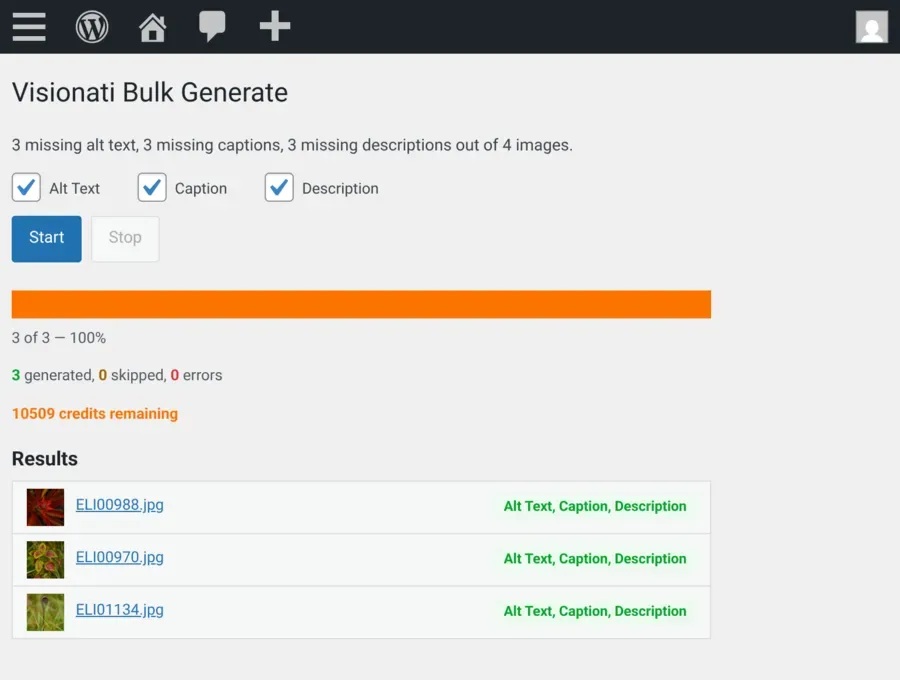
The Visionati WordPress plugin generates alt text, captions, and descriptions for every image in your Media Library, powered by your choice of AI model.
Why Use It
Section titled “Why Use It”Most WordPress sites have hundreds of images with no alt text. Screen readers skip them. Search engines can’t index them. Missing alt text hurts both accessibility and SEO.
Writing it by hand for an entire library is tedious. Visionati generates it from the image itself, using the AI model you choose: Claude (Anthropic), Gemini (Google), OpenAI, Grok (xAI), or others. One click per image, or bulk generate for your whole library.
What You Get
Section titled “What You Get”- Alt text: Short, accessibility-focused descriptions ready for screen readers and search engines.
- Captions: Brief text for displaying below images in posts and pages.
- Descriptions: Longer, detailed descriptions for the Media Library description field.
- WooCommerce product descriptions: Short and long product descriptions generated from the featured image, with product name, categories, attributes, and price included for context.
Each field uses the right AI persona automatically. You can override any of these in the settings.
Key Features
Section titled “Key Features”- Preview before apply: Generate, review, then Apply or Discard. Nothing is saved until you say so.
- Per-field buttons: Separate Alt Text, Caption, and Description buttons on every image. Each runs independently.
- Bulk generate: Process your entire library from a dedicated page under Media. Real-time progress, stop and resume, automatic detection if credits run out.
- Auto-generate on upload: New images get fields filled immediately. Choose which fields. Multiple fields run in parallel, so three take the same time as one.
- 7 AI models: Claude, Gemini, OpenAI, Grok, Jina AI, LLaVA, and BakLLaVA. Set one global default, then override for specific fields (e.g. Gemini for alt text, Claude for product descriptions). See AI Backends.
- 12 built-in roles and custom prompts: Alt Text, Caption, Ecommerce, General, and 8 more. Or write your own prompt for any field. See Roles.
- 160+ languages: Set your language once and every generation uses it. See Supported Languages.
- WooCommerce integration: Generate short and long product descriptions from featured images. Filter bulk runs by product status. Apply descriptions independently or both at once. See WooCommerce.
- Debug mode: Toggle in settings, traces to the browser console (F12). No server access needed.
Who It’s For
Section titled “Who It’s For”- Site owners: Fix every missing alt text field across your library without writing a word.
- Content teams: Generate alt text and captions during publishing, not as a cleanup project months later.
- Ecommerce stores: Turn product photos into short and long descriptions with real product context.
- Agencies: Configure once, bulk generate across the whole library. Done.
- Multilingual sites: Generate in any of 160+ supported languages.
Requirements
Section titled “Requirements”- WordPress 6.0 or later
- PHP 7.4 or later
- A Visionati API key (sign up)
- WooCommerce (optional, for product description features)
Visionati uses a credit-based system. Cost depends on which AI model you choose. See Credit System for details.
Get the Plugin
Section titled “Get the Plugin”Install directly from the WordPress Plugin Directory: go to Plugins → Add New Plugin in WordPress and search for “Visionati”. Or download from wordpress.org/plugins/visionati.
Source code is available on GitHub.
See Usage for step-by-step instructions.